
Analytics
See what readers look for, and what they cannot find
One admin page with your article views, top searches, searches with no results and helpful scores. All stored on your own site.
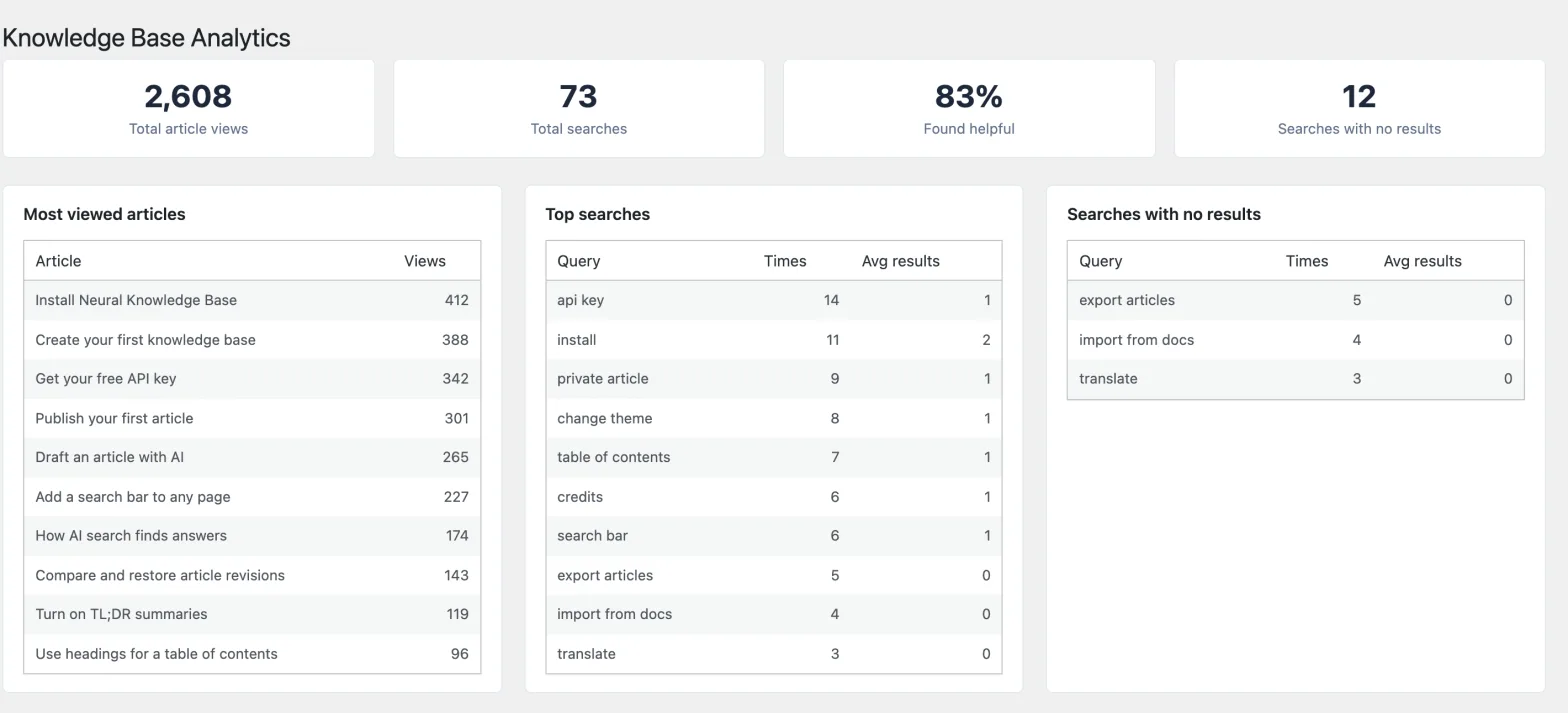
What it shows
Five reports on one page
Filter every report by knowledge base.
Totals
Article views, searches and the share of votes that found articles helpful.
Most viewed articles
Where readers spend their time.
Top searches
What people type, how often, and the average number of results.
Searches with no results
Questions your knowledge base does not answer yet.
Article feedback
Helpful and not helpful counts per article, with a percentage.
Why it matters
Your next article is already in the list
Searches with no results are questions readers asked in their own words. Write an article for each one, and the list gets shorter.
- No external tracking service
- Works without an API key
FAQs
Frequently asked questions
Is this data sent to Google or another service?
No. Views, searches and votes are stored in your WordPress database.
Can I see analytics per knowledge base?
Yes. Each report has a knowledge base filter.
Neural Knowledge Base
Know what your readers need
Analytics is part of the free plugin.