
Version history
Compare any two versions and restore the one you want
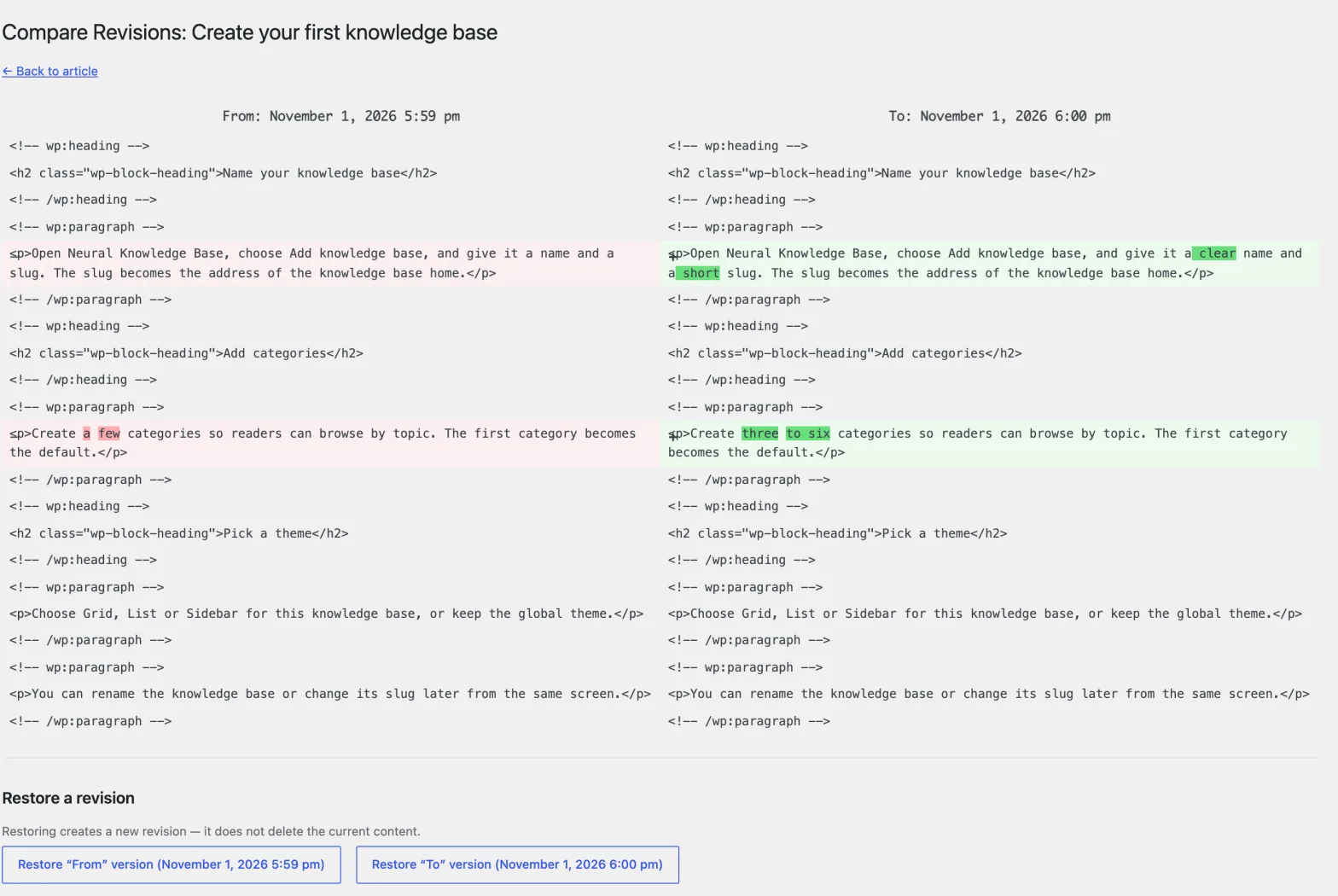
Every article keeps its revisions. Open a side-by-side diff, then restore an older version without losing the current one.
Article revisions
Change articles without fear
Built on WordPress revisions, with a diff screen made for articles.
Side-by-side diff
See what changed between two revisions, from and to, with dates.
Restore safely
Restoring saves a new revision, so the version you replaced is still there.
Identical check
The diff tells you when two revisions are the same.
AI versions
Every AI draft and summary is kept
AI output is saved as numbered versions in the editor sidebar. Preview any version, compare two with a word-level diff, pin the ones you want to keep, rename them, and use the one you like.
- Word-level diff between two versions
- Pin, rename, preview and delete
- Nothing is replaced without your click
Related features
Writing tools that work together
FAQs
Frequently asked questions
Do I need an API key for version history?
No. Article revisions and the diff screen are free with no key. AI versions appear once you use AI drafting or TL;DR summaries.
Does restoring delete newer changes?
No. Restoring creates a new revision. The newer content stays in the history.
Neural Knowledge Base
Edit with a safety net
Version history is included in the free plugin.